


When a delivery fails or a customer rejects a shipment, the work does not end. In many transport operations, that is the point where visibility starts to break down.
Outbound delivery is usually planned, assigned, tracked, and confirmed with clear controls. The return journey is often handled differently. Returns may begin with a customer request, move through manual updates and collection steps, and only reach the warehouse after several handoffs. Customer service often needs to intervene to track progress, while finance may be unable to proceed until proof of return is received.
That gap creates cost, confusion, and poor accountability.
For businesses running Microsoft Dynamics 365 Supply Chain Management or Business Central, returns should not sit outside the transport workflow. They should be managed as part of route execution, with the same level of control used for deliveries, pickups, and shipment updates.
Returns Are No Longer a Side Process
Reverse logistics has become too important to treat as an operational afterthought.
Returns affect more than warehouse processing. They influence customer experience, inventory accuracy, transport cost, refund timelines, replacement decisions, and reporting. When returns are not properly captured from the field, teams lose the context needed to make fast and accurate decisions.
A return may look simple on paper. In reality, it can involve several questions:
- Was it damaged before pickup?
- Was the correct package returned?
- Did the operator collect all expected items?
- Was the customer available?
- Was the return connected to the original order or shipment?
- Has the warehouse been notified?
- Can customer service confirm the return status?
If those answers live in phone calls, spreadsheets, chat messages, or operator memory, the business is already working with weak visibility.
Where Returns Usually Break Down
Returns often fail because they are disconnected from the route workflow.
The delivery may have a route leg, assigned operator, customer location, planned timing, shipment record, and proof of delivery. The return, however, may be treated as a manual follow-up task.
That creates common operational issues.
Inventory updates are delayed.
Returned items may arrive at the warehouse before the ERP record reflects what was collected. This can affect stock availability, replacement planning, and purchasing decisions.
Package condition is unclear.
Without photos, comments, or structured return notes from the point of pickup, teams may struggle to verify whether an item was damaged, incomplete, rejected, or incorrectly returned.
Customer service works without reliable status information.
When a customer asks about a refund or replacement, the service team may need to call dispatch, the operator, or the warehouse before giving an answer.
Finance waits for confirmation.
Credits, refunds, and reconciliations are slower when proof of pickup or return status is not linked to the relevant order or shipment record.
Dispatch loses route context.
If returns are added outside the planning process, they can disrupt route capacity, timing, operator workload, and vehicle usage.
The issue is not simply that returns are difficult. The issue is that many teams manage them outside the same system of control used for forward logistics.
Why Return Pickups Need Route-Level Control
A return pickup is still a transport movement. It has a customer, location, timing requirement, operator, vehicle, package, status, and operational outcome.
That means it should be planned and tracked at route level.
When return pickups are connected to route planning, dispatchers can make better decisions around:
- Which operator should handle the pickup
- Whether the pickup fits the current route
- Which vehicle has enough capacity
- Whether the pickup should be grouped with nearby stops
- What instructions the operator needs
- How the return will be confirmed
- How the warehouse will know what is coming back
This is where route-level control matters. It turns returns from a loose task into a managed part of transport execution.
Instead of treating returns as a separate cleanup process, transport teams can plan them alongside deliveries, pickups, service jobs, and other route activity.
The Operator’s Role in Return Capture
The operator is often the first person to see the returned item. That makes the field capture process critical.
If the operator cannot record the right information at the point of pickup, the rest of the business works from incomplete data.
A practical return workflow should allow operators to capture:
- Return reason
- Package or item details
- Quantity collected
- Package condition
- Photos where required
- Customer comments
- Pickup confirmation
- Signature where applicable
- Location and timestamp details
This reduces reliance on end-of-day explanations or manual messages after the route is completed.
It also protects the business. If there is a dispute about whether an item was collected, damaged, incomplete, or rejected, the return record should provide enough context for review.
Visibility Matters Across the Business
Returns expose a visibility gap that is easy to overlook. Getting an item back is rarely the difficult part. Maintaining the context around that movement is where things start to unravel.
A returned package may arrive at the warehouse exactly as expected, yet important details about the journey back can already be disconnected from the item itself. The reason for the return, the condition at collection, the circumstances surrounding the pickup, and the decisions made in the field often end up scattered across different records, systems, or conversations.
The result is not a lack of information. The result is information that has lost its relationship to the event it describes.
Questions that should have straightforward answers begin to require investigation. Teams piece together route updates, operator notes, customer communications, and return records to understand something that was already known at the point of collection.
Much of the friction associated with reverse logistics comes from this separation between the movement and its context.
Keeping return activity connected to the route record changes that dynamic. The collection, the operational details, and the outcome remain part of the same chain of events rather than becoming isolated records that need to be reconciled later.
Visibility then becomes more than confirmation that an item has been returned.
It becomes a clear understanding of what happened, why it happened, and how the return moved through the operation.
How RouteCTRL Supports Reverse Logistics
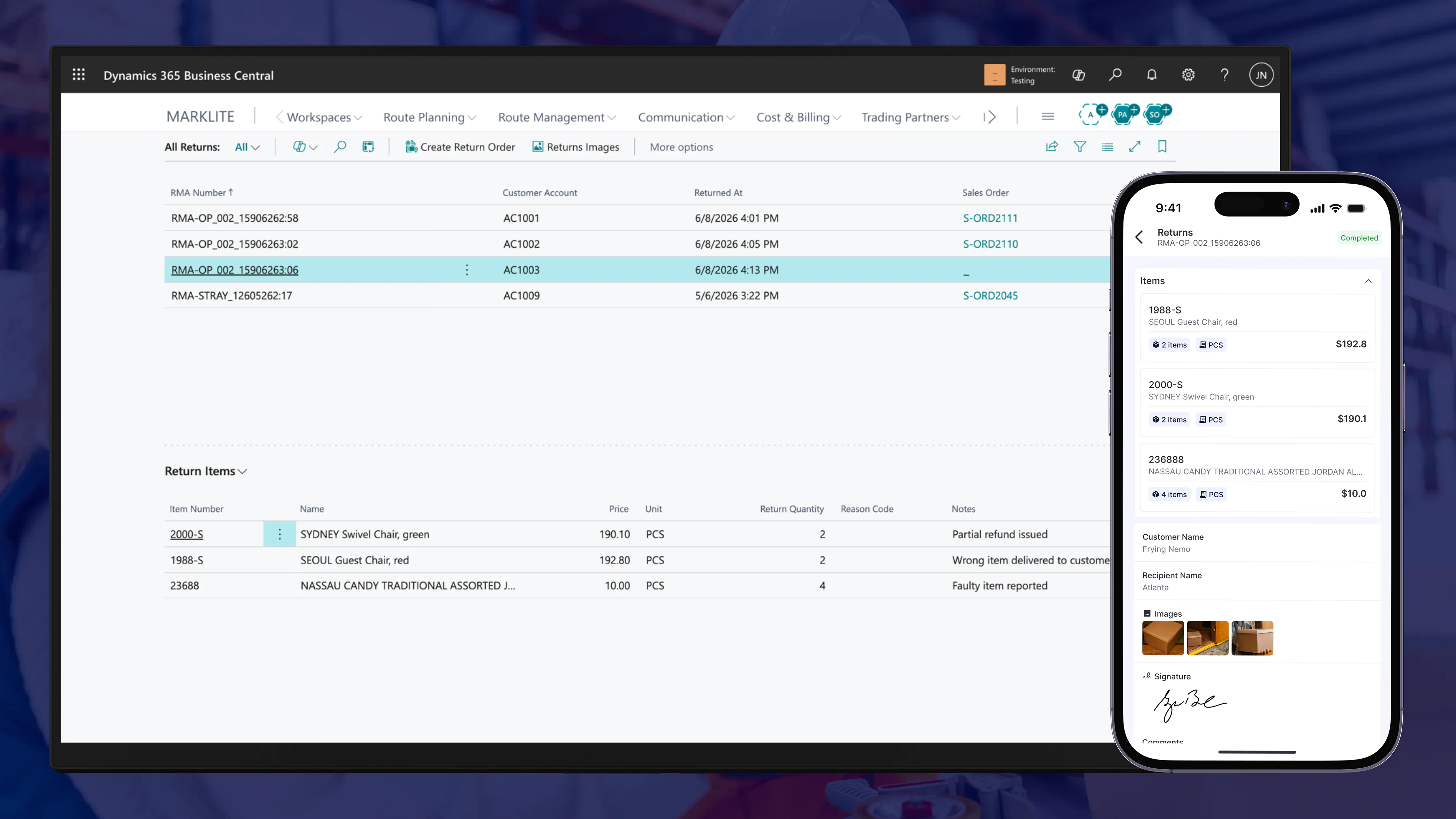
RouteCTRL helps Dynamics 365 users manage returns as part of transport execution, not as a disconnected side process.
In RouteCTRL, return activity can be connected to the same route workflow used for deliveries and pickups. This gives transport teams a clearer way to plan, assign, execute, and review return movements.
RouteCTRL supports reverse logistics through:
Returns package management
Teams can manage returned packages with better structure, helping ensure return activity is captured against the relevant operational records.
Return orders
Return orders can be brought into the transport workflow so they are handled as planned movements, not informal tasks.
Pickup workflows
Return pickups can be managed alongside other route activities, helping dispatchers control assignment, timing, and execution.
Operator-initiated returns
Operators can capture return activity from the field when returns occur during execution, reducing the need for manual follow-up after the route.
Package condition capture
Photos, comments, and return details can help teams review what was collected and in what condition.
Return status tracking through the Operator App
Operators can update return progress through the Operator App, giving teams better visibility into what is happening on the route.
Shipment and route status visibility
Return movements can be reviewed alongside other route activities, helping teams understand the actual outcome of transport execution.
Connection to Microsoft Dynamics 365 SCM and Business Central
Because RouteCTRL is built around Dynamics 365 transport workflows, return activity can be connected back to the ERP environment where orders, customers, inventory, and financial processes are managed.
The goal is simple: give teams a structured way to manage returns from the field back to the business record.
Returns Need the Same Discipline as Deliveries
Returns touch multiple parts of the business, including warehousing, customer service, finance, and transport operations.
At an operational level, they are a transport execution challenge.
A business that can plan a delivery, assign it to an operator, track its progress, capture proof, update its status, and review its outcome should apply the same operational discipline to returns.
Disconnected returns create avoidable problems:
- Poor customer updates
- Slow refund or replacement decisions
- Unclear package condition
- Delayed inventory visibility
- Manual dispatcher follow-up
- Weak accountability
- Higher transport cost
Route-level control helps reduce those gaps.
By managing returns as part of the transport workflow, teams gain a clearer picture of what happened, who handled it, where it happened, and what should happen next.
Conclusion
Returns should not become a side process after delivery fails. They should be planned, captured, tracked, and reviewed as part of transport execution.
For Dynamics 365 users, this matters even more. Orders, customers, inventory, finance, and transport activity should not operate in separate worlds. When return pickups and package records are connected to the route workflow, teams get better visibility and stronger operational control.
RouteCTRL helps bring returns, pickups, and route execution into one Dynamics 365-connected workflow, giving transport teams a practical way to manage reverse logistics with the same discipline as forward delivery.